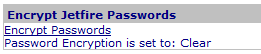
Jetfire Encrypt Jetfire Passwords Web Part
By default, Jetfire passwords are stored as clear strings in the database. Jetfire Passwords, stored in the database may be encrypted by clicking the 'Encrypt Passwords' link in the Web Part.
u
The 'Encrypt Passwords' action changes the application setting from 'Clear' to 'Encrypt' and edits each user in the subscription database, changing the password from clear to encrypted.
Access
The Web Part is accessed by the
Jetfire Admin Panel.
Edit Properties for the Web Part